
Tempo Alerts
Tempo Alerts extend Lightspeed Tempo to the POS, providing real-time service pacing cues directly on the floor plan. They help staff identify tables that need attention, recognise service delays and maintain consistent service.
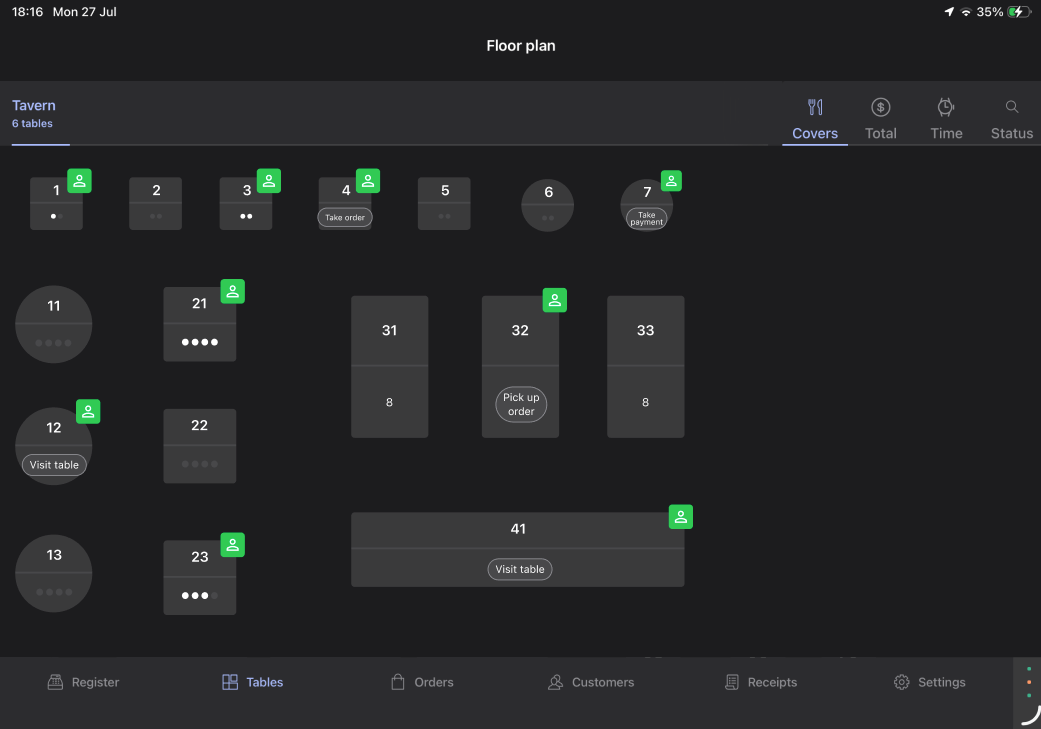
It compares POS, Reservations and KDS events with each location’s rolling three-month baseline, then shows a shared POS alert when a threshold is exceeded. Merchants can adjust timings and service stages in the Back Office. It is included in Pro and Premium packages and available as a paid Core add-on.
- Shows live service-pacing alerts on POS when an eligible service step takes longer than expected.
- Uses each location’s previous three months of data to establish service baselines.
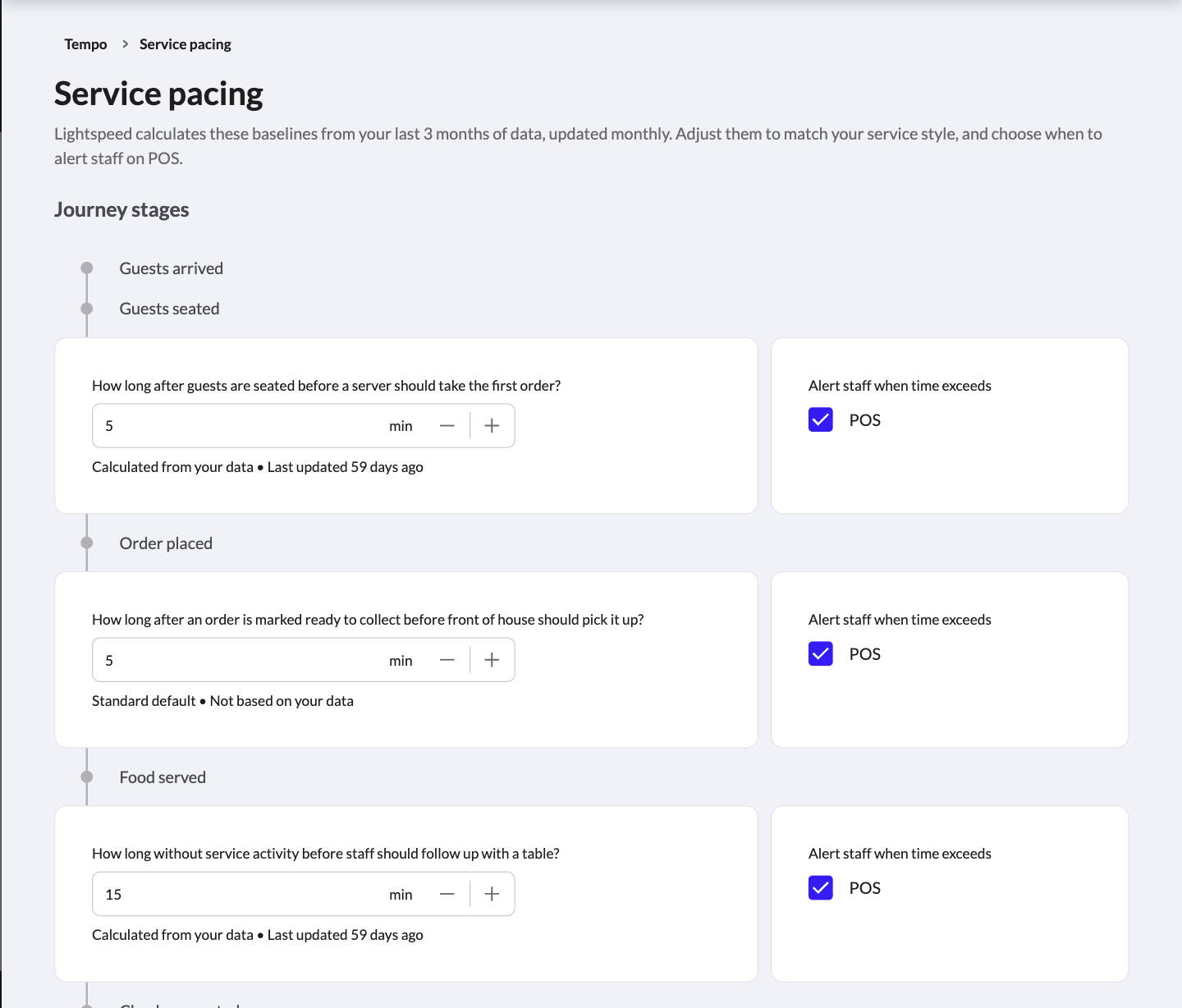
- Allows merchants to adjust timing thresholds, enable or disable service stages and reset timings.
- Uses live events from the POS, integrated Reservations and Lightspeed KDS where supported.
- Gives full visibility: POS alerts appear for all staff, not just the waiter assigned to the table or order.
- Gives full visibility: POS alerts appear for all staff, not just the waiter assigned to the table or order.
Tempo Alerts
- Supports real-time service intervention by flagging delays during service.
- Alerts staff when a table, order or service step takes longer than expected.
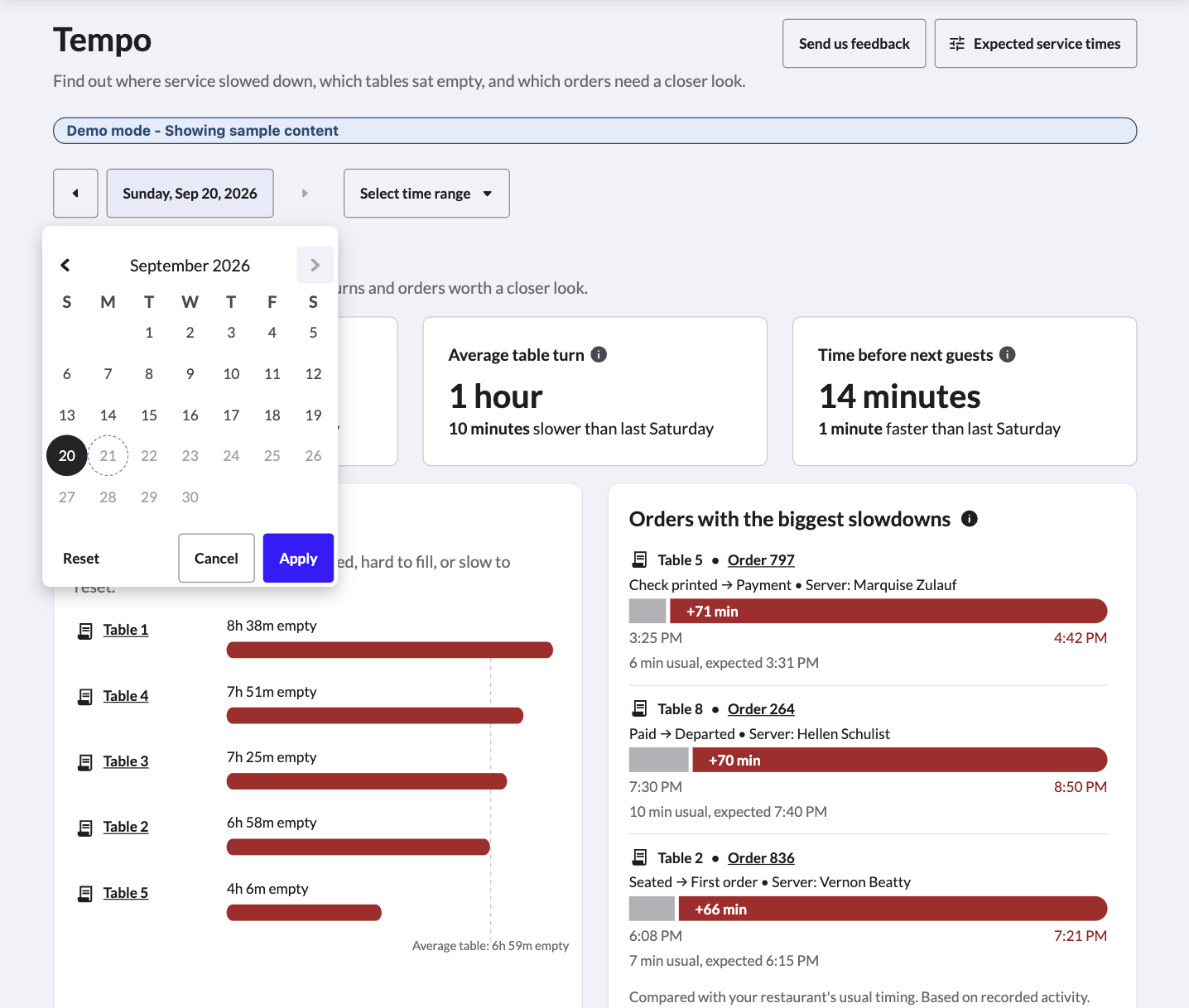
Tempo Dashboard
- Supports post-service analysis, helping managers understand what happened during service.
- Helps managers review table usage, order timing and service pacing.
How do Tempo Alerts help restaurant staff?
They reduce the mental effort required to monitor service pacing, helping staff prioritize tables, respond to delays and maintain service standards during busy shifts.
Who can see Tempo Alerts?
Tempo Alerts provide shared visibility to staff using the POS, rather than limiting alerts to the server assigned to a particular table.
How are alerts displayed on the POS?
Service pacing cues appear on the POS floor plan through visual indicators and colour changes, helping staff identify which tables require attention.
Which stages of service can Tempo Alerts monitor?
The demonstrated service journey includes seating guests, taking their first order, collecting food, serving guests, presenting the bill and completing payment. Each stage can have its own expected service time.
How do merchants activate Tempo Alerts?
Tempo Alerts will be enabled automatically for eligible customers during the rollout. Merchants do not need to activate them manually.
Where can merchants configure Tempo Alerts?
In the Back Office, navigate to Tempo and open the Expected service times page. Merchants can adjust timing thresholds and choose which service cues to enable or disable.
How are expected service times calculated?
Lightspeed automatically calculates service pacing baselines using historical data from the restaurant’s location. The presentation indicates that calculations use the previous three months of data and are updated monthly.
Can merchants customize their service pacing thresholds?
Yes. Merchants can adjust automatically calculated thresholds to reflect their operational requirements and preferred service standards.
Can merchants disable individual alerts?
Yes. Merchants can choose which service cues to display through the Expected service times page in the Back Office.
Will Tempo Alerts also be available through Lightspeed Pulse?
Tempo Alerts on Pulse are planned for a future release. The presentation indicates that merchants will eventually be able to manage their notification channels from a central Settings page.
Which Lightspeed packages include Tempo Alerts?
Tempo Alerts are included in the Pro and Premium packages and are available as a paid add-on for Core. The add-ons costs €39, £35, $45.
Are Tempo Alerts a standalone product?
Tempo Alerts are an extension of the existing Lightspeed Tempo product, bringing service pacing information from the dashboard directly to the POS.
What are the main benefits merchants should understand?
Tempo Alerts help restaurants identify which tables need attention, reduce the mental workload on servers, identify delays before guests notice and maintain consistent service standards across shifts.
Is Tempo Alerts real-time?
Tempo Alerts uses live events from the POS, integrated Reservations and Lightspeed KDS. Alerts may be delayed or unavailable if a device, network or required event is unavailable.
Does Tempo Alerts require Lightspeed KDS?
No. KDS is required specifically for the Pick up order alert; Take order, Visit table and Take payment can work without KDS when their required events are available.
Can staff manually dismiss a Tempo Alert?
No. Alerts clear through the relevant service event or when the related order or table is closed or cleared.
Does changing a threshold update historical Tempo data?
No. Threshold changes affect future alerts after the new setting is applied. Historical activity continues to use the threshold that was active at the time.
Are the default thresholds the same for every restaurant?
No. Historical thresholds are calculated from each location’s own service history. The Pick up order alert is the exception, starting with a fixed five-minute default.
What does P90 mean in Tempo’s baseline calculations?
P90 means the 90th percentile. It places the default threshold near the slower end of the restaurant’s normal historical range; it is not a guaranteed service target.
What happens if Tempo does not have enough historical data?
Tempo may provide a provisional baseline, no calculated baseline, or allow a manager to set a custom timing, depending on the available data for that journey stage. Required product events are still necessary.
How quickly do changed settings reach the POS?
The change takes effect after each POS device receives and applies the updated settings. A manual or remote device reload is the fastest way to apply the change.


